Last week 520k lines of code leaked from Anthropic to show how Claude Code runs. If you’re curious, here’s one write up. This is one of the strangest security breaches of the year: one of the top closed AI agents was accidentally made open sourced from a source map file that was not removed in review process.
The way the team plans to fix that kind of breach from happening in the future? More Claude Code in the process.
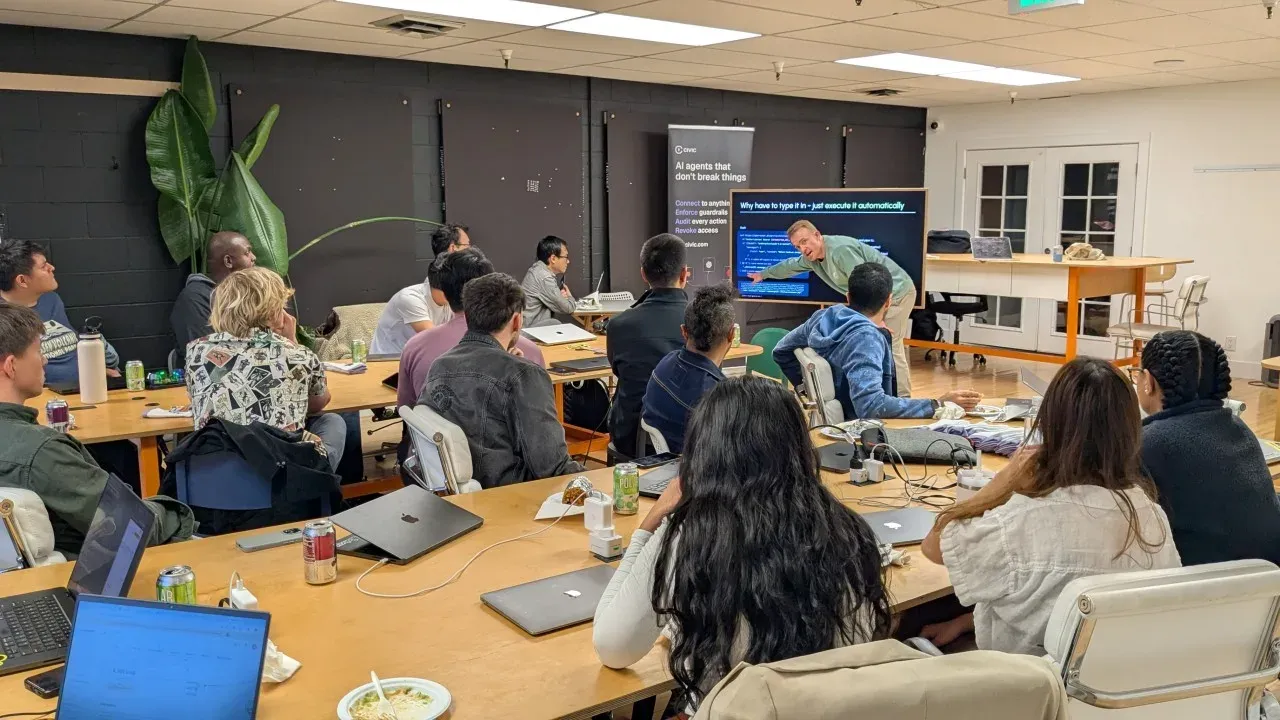
At the same time as that was happening online, we ran a workshop in person with Will Sentance, founder of Codesmith and fellow at South Park Commons, for how to write an agent from scratch in 20 lines of code.
Inspired by the intentionally open sourced agent, OpenClaw, this walks through how a self improving agent loop is built from the ground up in JavaScript. It covers the essentials for a self improving agent that can be run locally, which can add its own skills and tools, better design its own TUI, and more. All built within 2 hours, line by line, with many people joining having no technical background.
This workshop was supported by Titus Capilnean and Nancy Li of Civic Technologies, helping ensure agents are secure from run one with guardrails and permission management.
The agent loop
Every AI coding agent, including Claude Code, Cursor, Devin, Codex, OpenClaw, runs a version of this same loop. The user types in a message which gets sent to a large language model that decides if it will use a tool and what tool to use. As it calls a tool, it runs the command and feeds back the tool and result to the large language model, looping until it decides to break and print message. There can be different tools and different parts to the loop, but this is the simplest agent loop.
The workshop structure and code
Note, this was for educational and demo purposes only to help people understand how the core part of the agent loop works within OpenClaw. This code is not meant for production.
Setup: Install Bun, get an OpenRouter API key, verify the connection
01 Curl Basics: Talk to an AI model with raw HTTP. Understand POST, auth, and the message format.
02 Pipe & Execute: Extract the AI’s response with jq and pipe it into bash. Use natural language to generate the commands used in step 1.
03 JavaScript Agent: Move from curl to fetch, from jq to JSON, from piped bash to Bun.$
04 While Loop Agent: Add memory (messages array) and retry logic (while loop that feeds errors back)
05 Tool Calling: Structured tool use — the AI signals “run this” vs “here’s my answer”
Extra builds
Skills System: Extend the capabilities of the agent with markdown files. No extra code.
Ralph Loop: Solve the context management problem with continuous looping and a log of progress.
h/t Dennis Corsi and Will Sentance.
Here are the 20 lines
const messages: { role: string; content: string }[] = [ { role: "system", content: "Return only mac bash commands. No backticks. Output raw string only." }, ];

for await (const line of console) { messages.push({ role: "user", content: line });

while (true) { const data = await ( await fetch("https://openrouter.ai/api/v1/chat/completions", { method: "POST", headers: { Authorization: `Bearer ${process.env.OPENROUTER_API_KEY}` }, body: JSON.stringify({ model: "openrouter/free", reasoning: { exclude: true }, messages }), }) ).json();

const message = data.choices[0].message; messages.push(message);

try { await Bun.$`sh -c ${message.content}`; console.log("✓", message.content); break; } catch (error: any) { messages.push({ role: "user", content: `Command failed: ${error.message}` }); console.log(`✗ Failed: ${message.content}. Retrying...`); } } }
A walkthrough, line by line
That’s the whole agent. The while(true) is the engine. It chains as many tool calls as it needs (list files, read one, edit it, run tests). Each tool run and response gets added back into the message array and sent back to the large language model for next steps before it decides to respond with text and break.
Security with Civic
With agent loops being able to control a computer and read files, it’s easy for things to go wrong:
Prompt poisoning, when an agent reads a website or message with malicious text inserted
Authorization management, when starting to connect an agent to other tools, like Gmail or Slack Guardrails, ensuring that the agent is not doing anything it’s not supposed to
Titus Capilnean from Civic Technologies showed how they help act as a layer between an agent and managed authorizations through their MCP server. Every kind of agent, from Claude Code to OpenClaw can use Civic. More here.
The tl;dr
-
Every AI coding agent — Claude Code, Cursor, Devin, Codex, OpenClaw — runs a version of the same loop: send messages to a model, check if it wants to use a tool or respond with text, feed results back, repeat until it breaks.
-
AI models are stateless, like waking up with amnesia. Every time you call the API, you send the entire conversation history from scratch. The messages array is the memory, and you maintain it yourself. 3. Tool calling is what turns a chatbot into an agent. Instead of parsing free text and hoping the model listened, it uses a structured protocol to signal “run this command” versus “here’s my answer.”
-
You can extend an agent’s capabilities by dropping a markdown file into a folder. No code changes. Skills are just natural language instructions the model reads and follows.
-
When a task outgrows a single conversation, externalize state to files and loop in short iterations so the model never accumulates enough stale context to lose track of the goal.
Thank you to our partners and co-hosts
Will Sentance for leading the workshop, including everyone, and enabling this kind of understanding for people with all backgrounds
Titus Capilnean and Nancy Li for the support and sharing important security considerations when working with agents
Miguel Villafuerte (he/his) and @garvin
Nate Padgett and Studio 45 for the physical space for these kinds of workshops to happen
If you want to see full code walk through, step by step, check out this blog post.
See you at the next build!
Hi I’m Michael, Founder of Worldwide Studios, where we help people build with the latest AI tools, hardware, and applied sciences. From 2hr intros like this one to 100 day fellowships, we help people make sense of how things are changing to solve real problems.